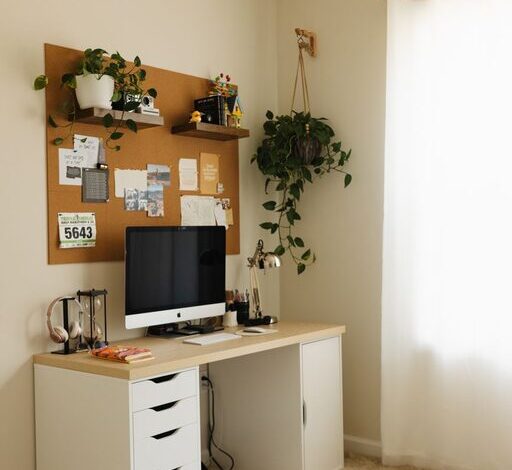

Simple and Effective Tips for Organizing Your Home Workspace
Creating an organized workspace at home can greatly improve your focus and productivity, making your work hours more enjoyable and efficient. Whether you have a dedicated office room or a small corner in your living space, organizing your workspace doesn’t have to be complicated. With a few simple and effective tips, you can turn your area into a neat and inspiring place to work. Here’s how to start.
Why Organize Your Home Workspace?
A cluttered workspace can lead to distraction and stress, while a tidy and well-organized area helps you stay focused, find things quickly, and maintain a professional mindset. Organizing your workspace also helps reduce wasted time and keeps your equipment in good condition.
Step 1: Clear and Declutter
Before you arrange anything, start by clearing your desk and surrounding area.
– Remove everything from your desk and shelves.
– Sort your items into categories: essentials, occasionally used, and unnecessary.
– Donate, recycle, or discard items you no longer need.
– Limit the items on your desk to only what you use daily.
Step 2: Use Smart Storage Solutions
Proper storage helps keep your workspace tidy and items easy to access.
– Drawers and organizers: Use drawer dividers to keep stationery and small items categorized.
– Shelving: Vertical shelves free up desk space and allow you to store books, files, or decorative items.
– Containers: Small cups or boxes for pens, clips, and cables prevent mess.
– Filing systems: Use folders or binders to organize papers and documents.
Step 3: Optimize Your Desk Layout
Arrange your workspace so that everything you need is within easy reach.
– Place your computer or laptop centrally.
– Keep your phone and frequently used items on your dominant hand’s side.
– Use a monitor stand to free up space underneath.
– Position your lamp to reduce glare and shadows.
Step 4: Manage Cables and Electronics
Cables can easily become tangled and messy, causing frustration.
– Use cable clips or ties to bundle and secure power cords.
– Consider a cable organizer box to hide excess wires.
– Label cables to help identify devices quickly.
– Choose wireless devices where possible to reduce clutter.
Step 5: Personalize Thoughtfully
Personal touches can make your workspace more welcoming but keep them minimal to avoid clutter.
– A small plant adds freshness and improves air quality.
– A few photos or meaningful objects provide motivation.
– Use a simple calendar or planner to keep track of deadlines.
– Stick to a neutral color palette with a few accent colours to keep the space calm.
Step 6: Maintain Regularly
Organization is an ongoing process. Set aside time weekly to tidy your workspace.
– Clear unnecessary papers and items daily.
– Wipe surfaces to keep your desk clean.
– Reassess your storage system if you find clutter reappearing.
– Keep digital files organized on your computer as well.
Step 7: Create Zones If Possible
If you have room, divide your workspace into zones for different activities.
– A computer/work zone with your desk and chair.
– A writing or brainstorming zone with a whiteboard or notepad.
– A storage zone with shelves and filing cabinets.
– This helps your brain shift between task types and keeps tools in designated places.
—
By following these simple steps, you can enjoy a neat, organized workspace that supports your productivity and wellbeing. Remember, an organized home office is not about perfection but creating a space that works for you. Start small, and over time, your workspace will become an efficient and pleasant work environment.